
IBM FlashSystem 5000 Monitoring
Domotz IT Infrastructure monitoring software allows you to monitor IBM FlashSystem 5000, a SAS-based storage solution for small and medium enterprises that need simple, flexible storage.
Our full list of integration scripts allows you to access and extract valuable data about general information, physical drives, managed disks, and more.
Note that the following scripts use the HTTPS protocol and have been validated and tested on FlashSystem5000 8.5.0.6.
Simplify your IBM FlashSystem 5000 monitoring with Domotz.

How to Monitor IBM FlashSystem 5000 General Information
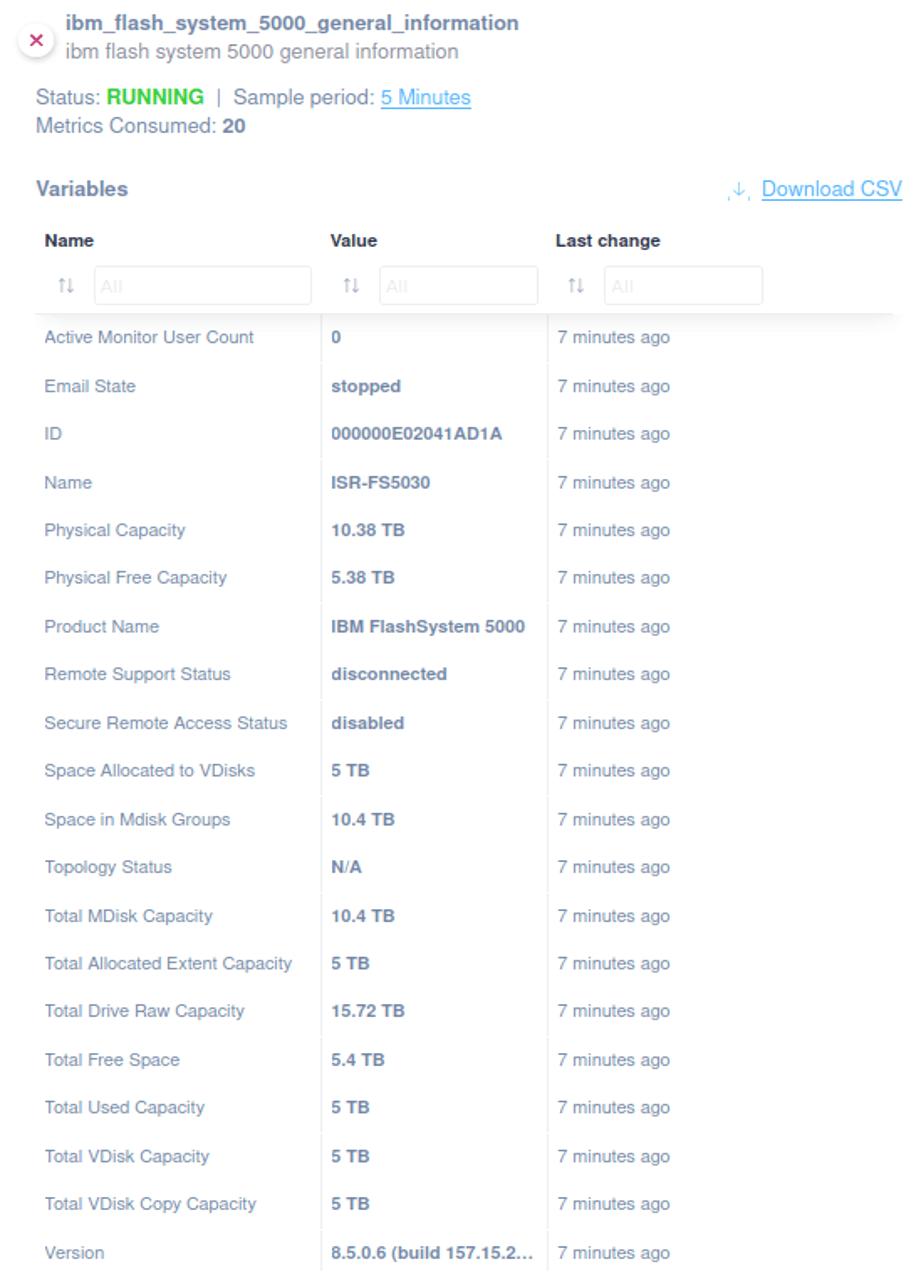
Domotz offers an integration script to help you extract general information about IBM FlashSystem 5000.
Use our ready-to-use script to monitor the following:
- ID
- Name
- Version
- Total MDisk Capacity
- Space in Mdisk Groups
- Space Allocated to VDisks
- Total Free Space
- Total VDisk Copy Capacity
- Total Used Capacity
- Total VDisk Capacity
- Total Allocated Extent Capacity
- Email State
- Total Drive Raw Capacity
- Topology Status
- Product Name
- Physical Capacity
- Physical Free Capacity
- Secure Remote Access Status
- Active Monitor User Count
- Remote Support Status
Quickly open our library and choose the custom script that fits your needs.
How to Monitor IBM FlashSystem 5000 Physical Drives
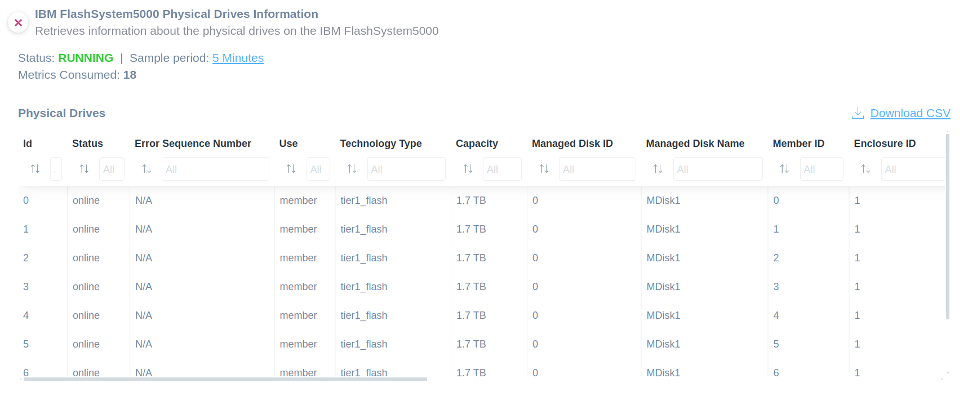
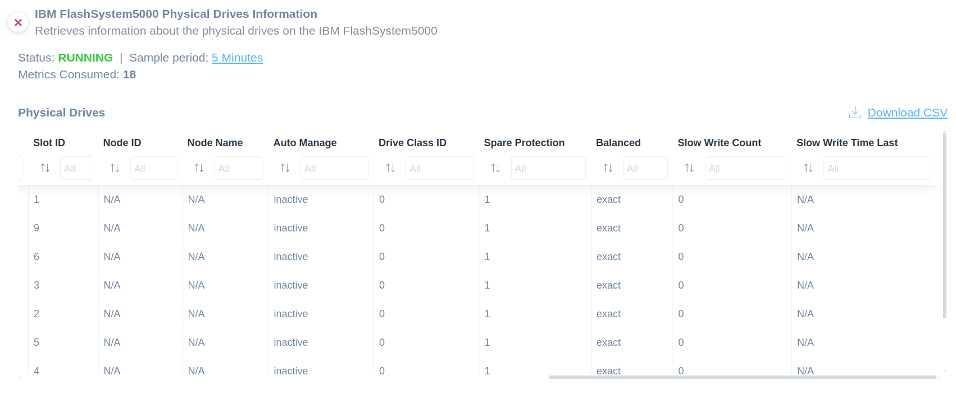
To monitor physical drive information about your IBM FlashSystem 5000, you can easily apply our dedicated script.
Use it to create a table with the following:
- Status
- Error Sequence Number
- Use
- Technology Type
- Capacity
- Managed Disk ID
- Managed Disk Name
- Member ID
- Enclosure ID
- Slot ID
- Node ID
- Node Name
- Auto Manage
- Drive Class ID
- Spare Protection
- Balanced
- Slow Write Count
- Slow Write Time Last
You can find the script in our examples library.
How to Monitor IBM FlashSystem 5000 Managed Disks


Apply our script to effectively oversee the status, capacity, and other useful information about your managed disks within your IBM FlashSystem 5000 devices. This precision tool fetches exhaustive details, ensuring optimal cooling and operational efficiency.
This scripts retrieve detailed information about:
- Name
- Status
- Managed Disk Group Name
- Capacity
- RAID Status
- Strip Size
How to Monitor IBM FlashSystem 5000 Storage Pools
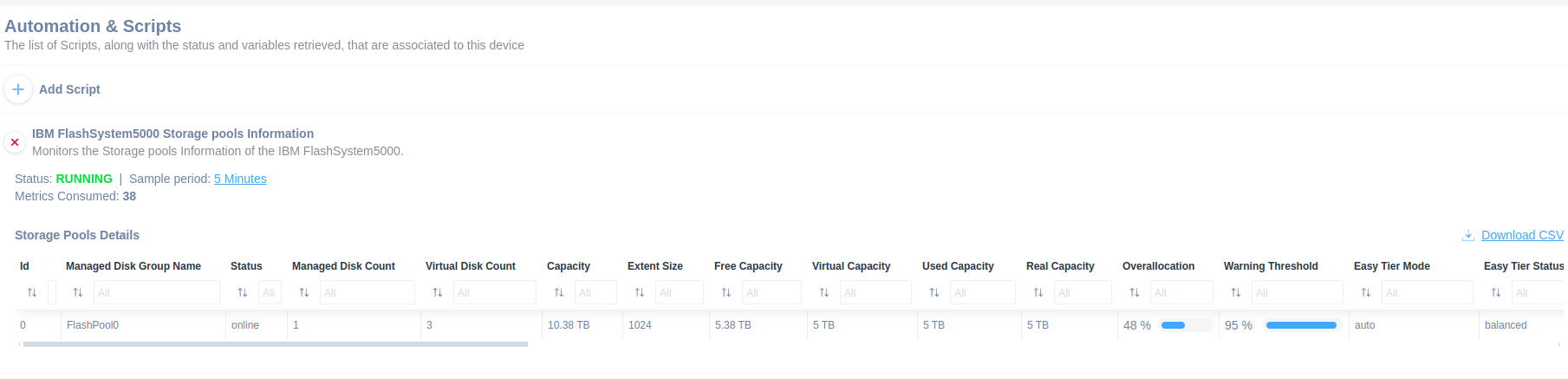
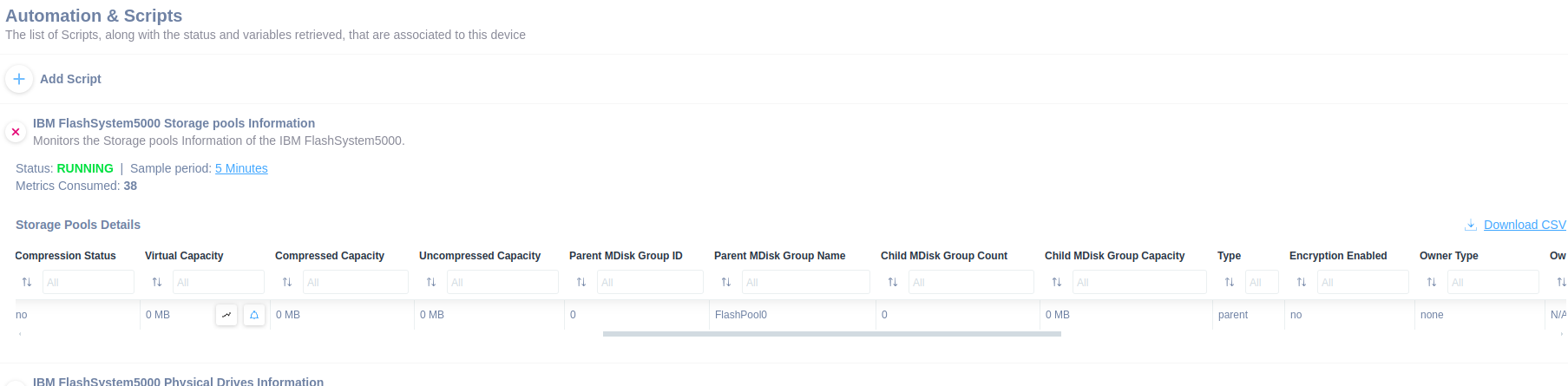

This script provides rapid access to several important information about the storage pools.
Key features include monitoring of:
- Managed Disk Group Name
- Status
- Capacity
- Free Capacity
- Type
Use this script, available in our library, to stay ahead of potential issues. Choose the version that best meets your monitoring requirements to ensure your IBM FlashSystem 5000 devices maintain optimal performance and reliability.
How to Monitor IBM FlashSystem 5000 Cloud Call Home
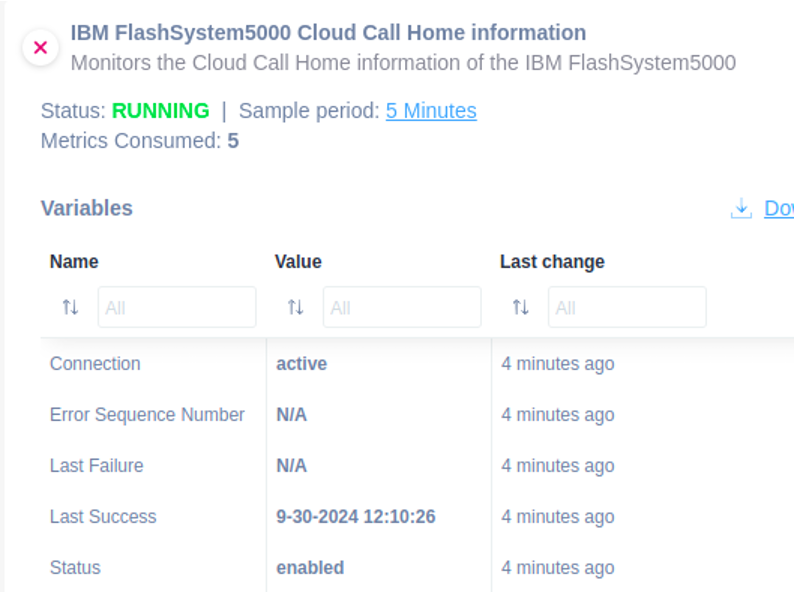
This script allows you to integrate IBM Storage systems with IBM Storage Insights to collect detailed configuration, capacity, and performance metadata.
You can utilize this script to effectively monitor the Cloud Call Home status of the FlashSystem 5000.
The following information can be monitored:
- Status
- Connection
- Error Sequence Number
- Last Success
- Last Failure
Simplify the monitoring of IBM FlashSystem 5000 Cloud Call Home info.
How to Monitor IBM FlashSystem 5000 System Updates
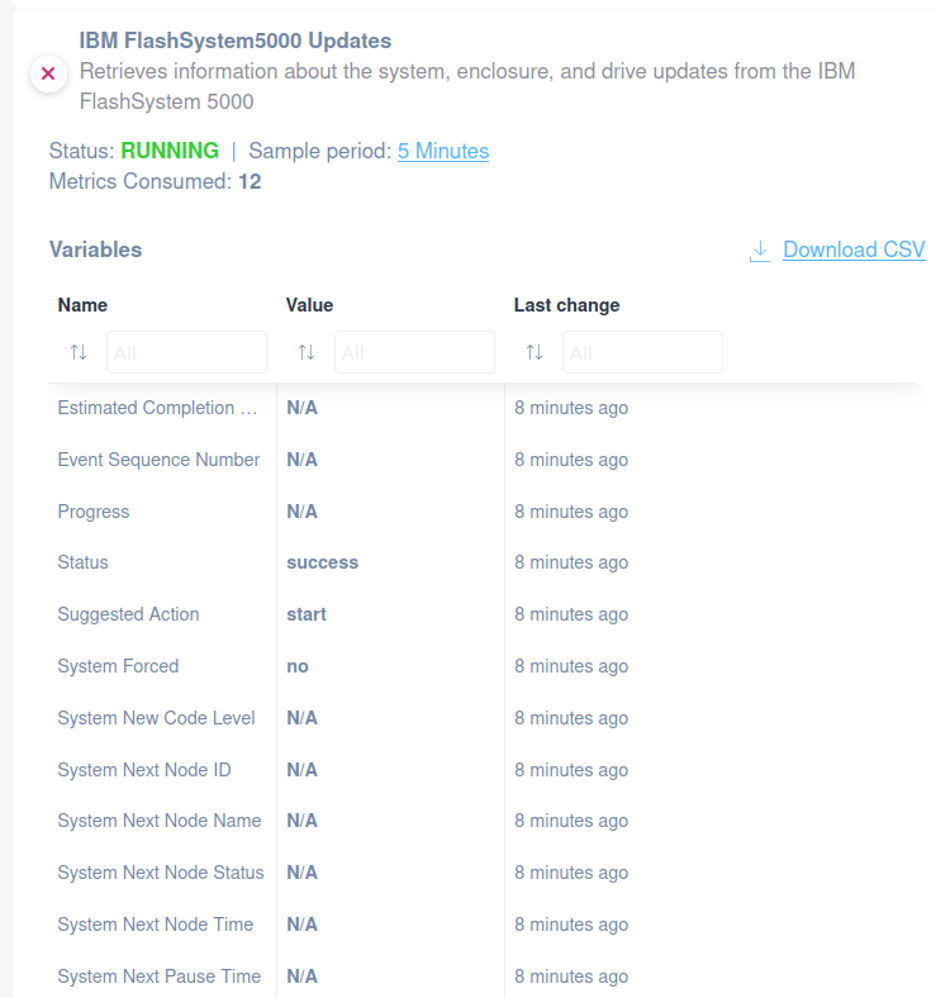
You can rely on our script to monitor the system, enclosure, and drive updates of the FlashSystem 5000.
This ready-to-use script enables you to monitor the following:
- Status
- Event Sequence Number
- Progress
- Estimated Completion Time
- Suggested Action
- System Forced
- System New Code Level
- System Next Node Status
- System Next Node Time
- System Next Node ID
- System Next Node Name
- System Next Pause Time
Quickly open our library and choose the IBM FlashSystem 5000 custom scripts that fit your needs.
How to Monitor IBM FlashSystem 5000 Enclosure Details
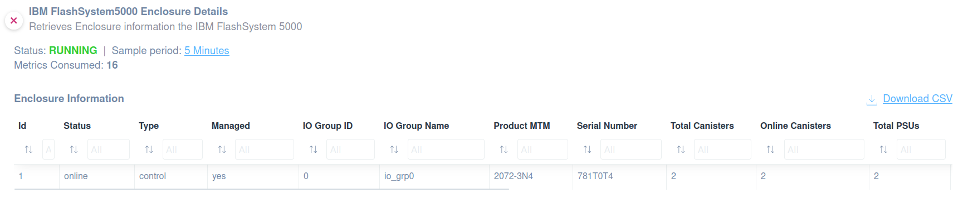
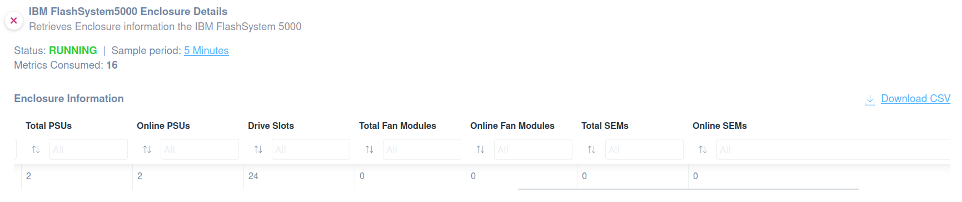
Apply the IBM FlashSystem 5000 enclosure details to improve your monitoring activities on the following valuable data:
- Status
- Type
- Managed
- IO Group ID
- IO Group Name
- Product MTM
- Serial Number
- Total Canisters
- Online Canisters
- Total PSUs
- Online PSUs
- Drive Slots
- Total Fan Modules
- Online Fan Modules
- Total SEMs
- Online SEMs
Browse our library to find the other custom scripts related to IBM FlashSystem 5000.
How to Monitor IBM FlashSystem 5000 Enclosure Canister
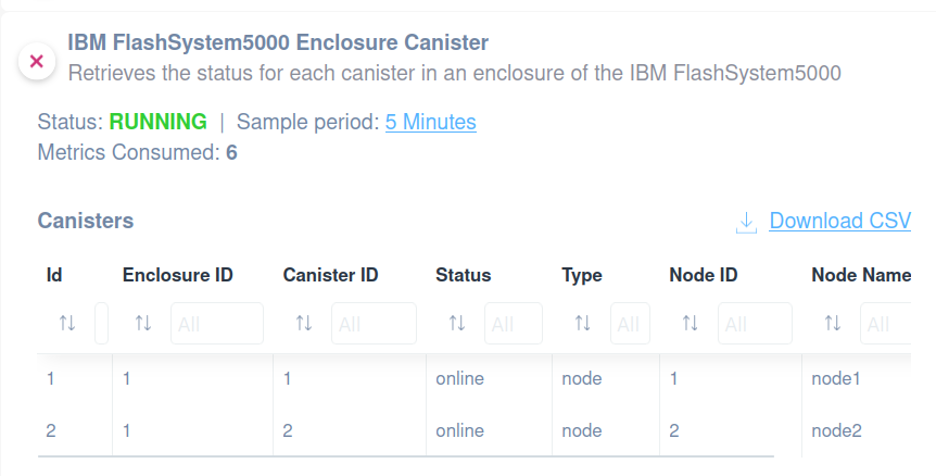
This script is essential for monitoring the status of each canister within an enclosure of the IBM FlashSystem5000, ensuring proactive management and maintenance.
You will able to monitor the following:
- Enclosure ID
- Canister ID
- Status
- Type
- Node ID
- Node Name
Find it in our library.
How to Monitor IBM FlashSystem 5000 Volume Management
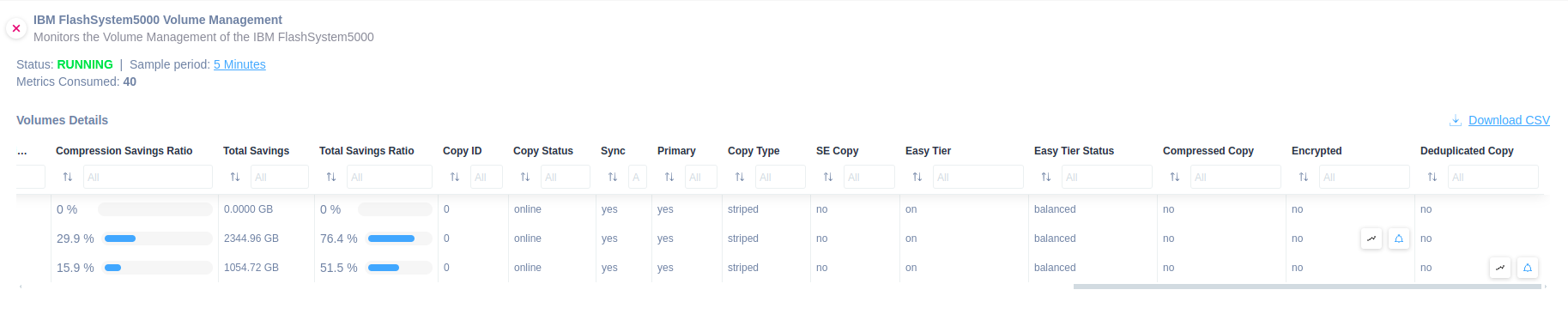
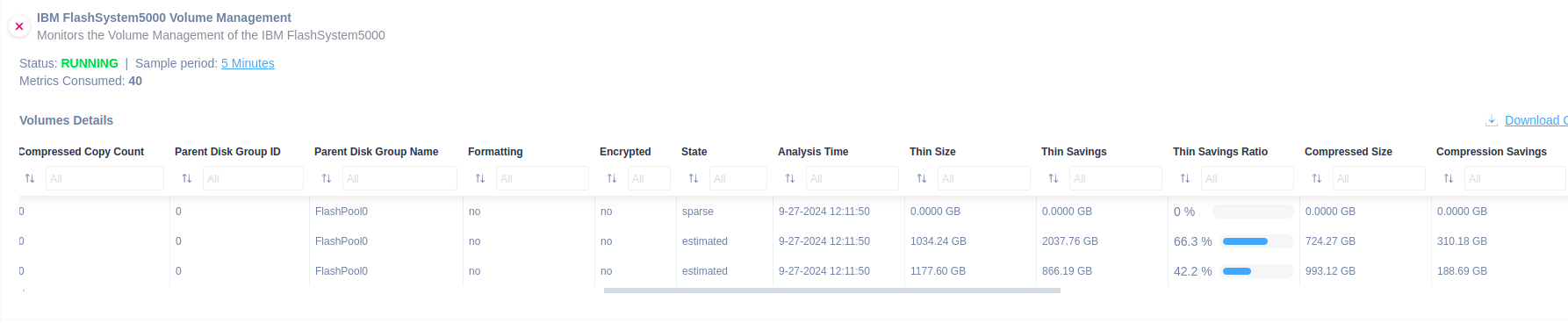

This script is essential for effectively monitoring the Volume Management of the IBM FlashSystem5000, ensuring optimal performance and early detection of potential issues.
The following information can be monitored:
- Name
- Status
- Disk Group Name
- Capacity
- State
- Deduplicated Copy
Quickly open our library and choose the custom script that fits your needs.
How to Monitor IBM FlashSystem 5000 Quorum Disk
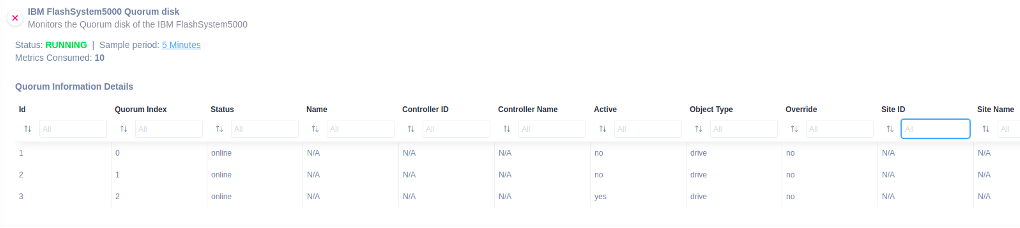
If you need to extract more information about IBM FlashSystem 5000 Quorum Disk, used for system management, you should apply this specific script.
You can get access to the following information:
- Id
- Quorum Index
- Status
- Name
- Controller ID
- Controller Name
- Active
- Object Type
- Override
- Site ID
- Site Name
Find it in our library.
How to Monitor IBM FlashSystem 5000 iSCSI Ports
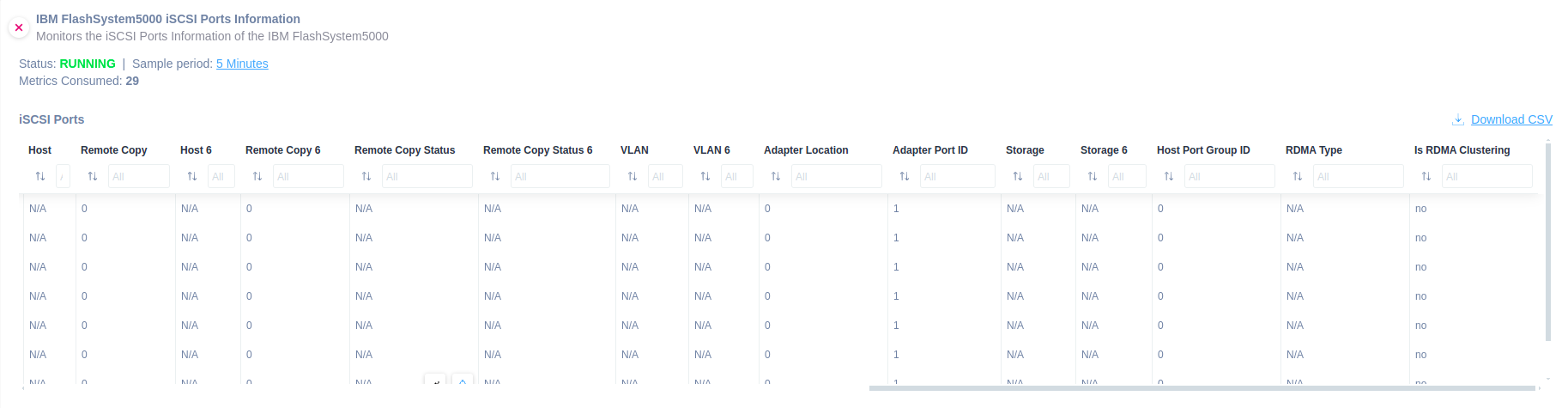
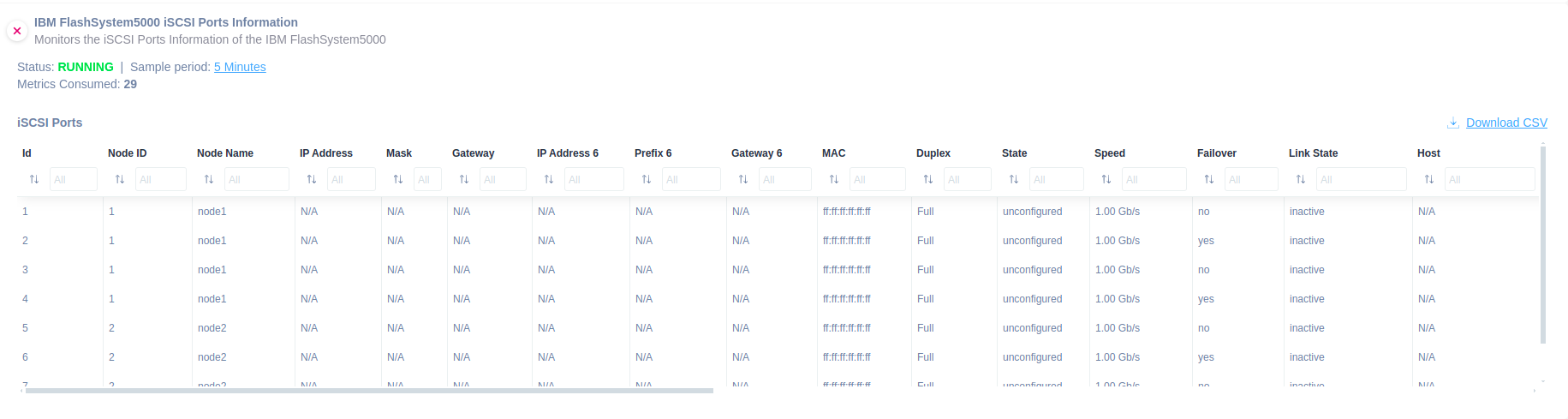
You should select and apply this script if you need to monitor the iSCSI IP addresses assigned for each port on each node canister to verify connectivity and configuration status.
You will be able to monitor the following information:
- Node ID
- Node Name
- State
- Failover
- Link State
How to Monitor IBM FlashSystem 5000 Physical Ethernet Ports
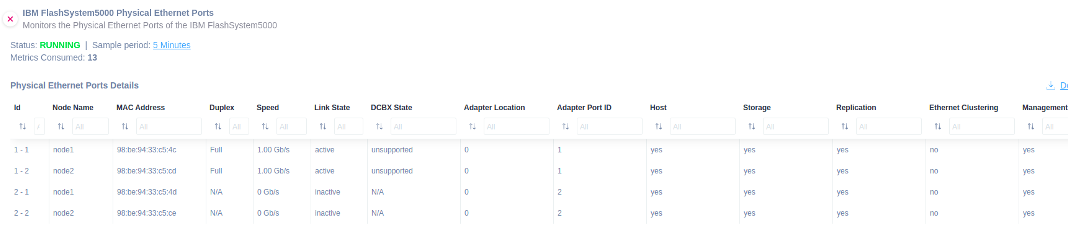
Apply this specific script to extract more details of physical ethernet ports:
- Id
- Node Name
- MAC Address
- Duplex
- Speed
- Link State
- DCBX State
- Adapter Location
- Adapter Port ID
- Host
- Storage
- Replication
- Ethernet Clustering
- Management
Quickly open our library and choose the custom script that fits your needs.
How to Monitor IBM FlashSystem 5000 Fibre Channel I/O Ports
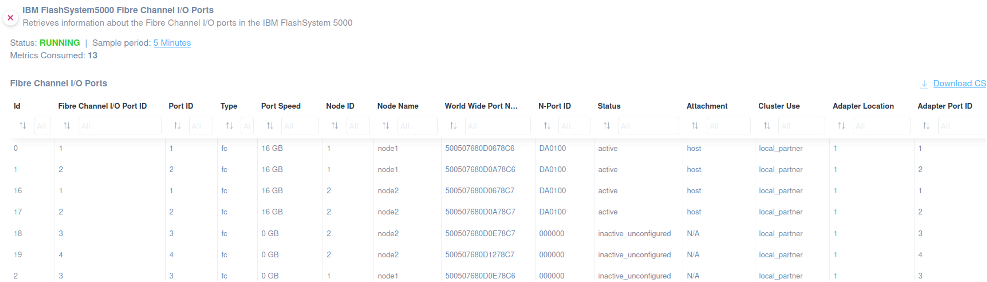
Domotz offers an integration script to help you extract data about fiber channel I/O ports.
Find it ready to use to extract the following general properties:
- ID
- Fibre Channel I/O Port ID
- Port ID
- Type
- Port Speed
- Node ID
- Node Name
- World Wide Port Name
- N-Port ID
- Status
- Attachment
- Cluster Use
- Adapter Location
- Adapter Port ID
Easily monitor crucial information about your IBM FlashSystem 5000 with our scripts.
How to Monitor IBM FlashSystem 5000 SAS Ports
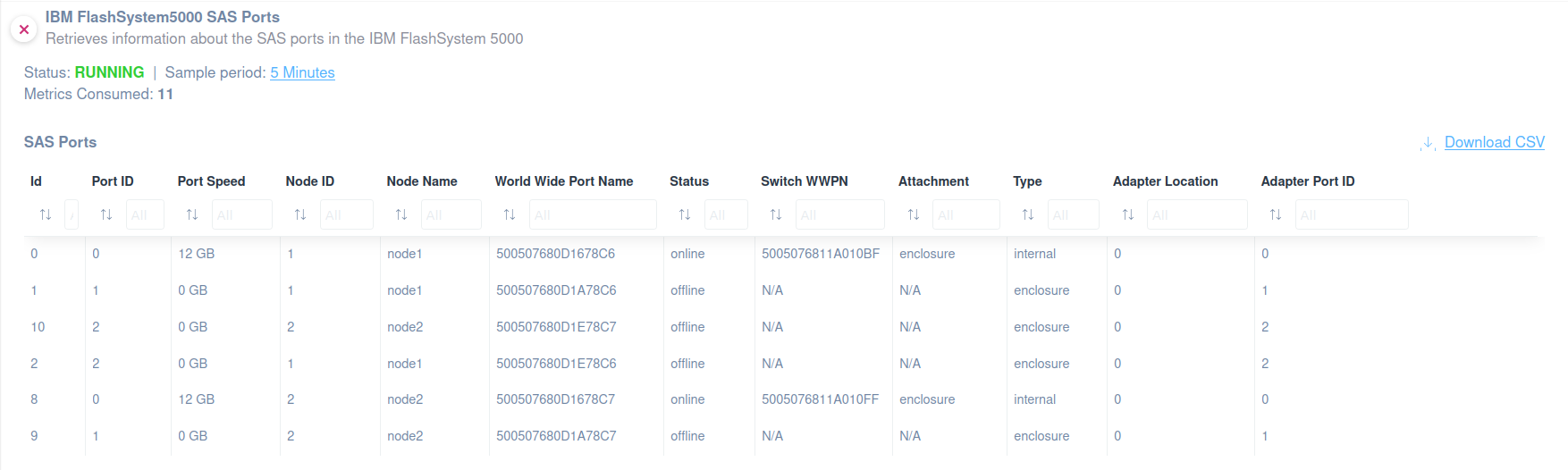
If you need to extract more information about IBM FlashSystem 5000 SAS ports, you should apply this specific script.
You can get access to the following information:
- ID
- Port ID
- Port Speed
- Node ID
- Node Name
- World Wide Port Name
- Status
- Switch WWPN
- Attachment
- Type
- Adapter Location
- Adapter Port ID
Quickly open our library and choose the custom script that fits your needs.
How to Monitor IBM FlashSystem 5000 USB Ports Used
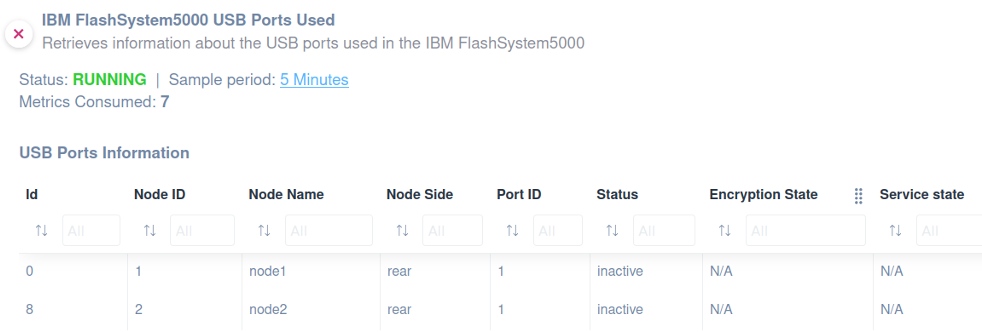
Apply this integration script to monitor the USB ports used and extract important information, such as:
- Id
- Node ID
- Node Name
- Node Side
- Port ID
- Status
- Encryption State
- Service State
How to Monitor IBM FlashSystem5000 - DNS Servers
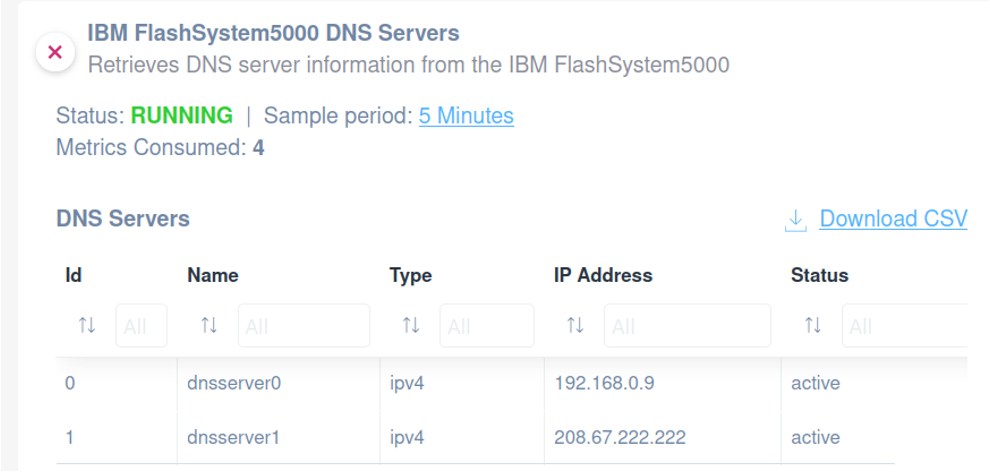
Need to monitor DNS servers on the IBM FlashSystem5000?
Ensure reliable network communication, optimal performance, and security by applying our ready-to-use script.
You will be able to monitor the following:
- ID
- Name
- Type
- IP Address
- Status
Prevent downtime by detecting issues early and maintaining proper system configuration. Quickly open our library and choose the custom script that fits your needs.
How to Monitor IBM FlashSystem 5000 Enclosure PSUs Batteries
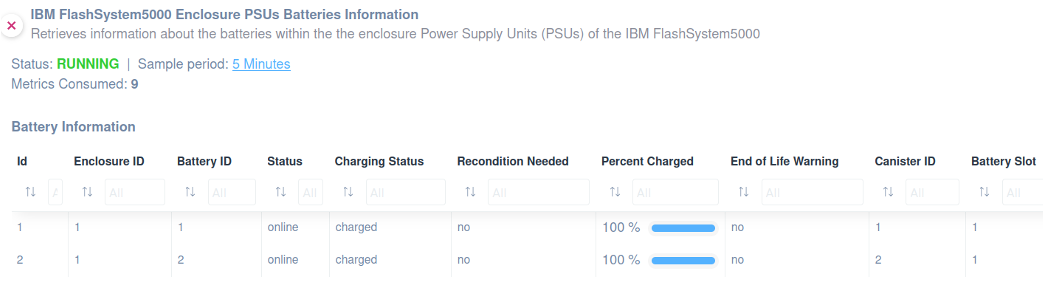
Monitoring enclosure PSU batteries on the IBM FlashSystem5000 ensures a reliable power supply, preventing failures or interruptions.
Applying our script will help detect battery issues early, ensuring system stability and minimizing downtime.
You can extract the following information:
- ID
- Enclosure ID
- Battery ID
- Status
- Charging Status
- Recondition Needed
- Percent Charged
- End-of-Life Warning
- Canister ID
- Battery Slot
Find it in our library.
How to Monitor IBM FlashSystem 5000 Enclosure Power Supply Unit
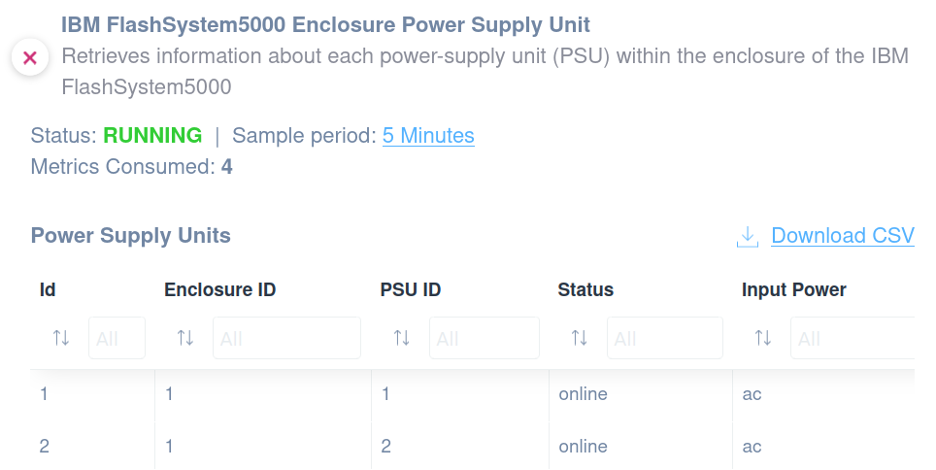
You might use this script to monitor the enclosure power supply unit of your IBM FlashSystem 5000.
The following information can be monitored:
- ID
- Enclosure ID
- PSU ID
- Status
- Input Power
Quickly open our library and choose the custom script that fits your needs.
How to Monitor IBM FlashSystem 5000 Enclosure Statistics
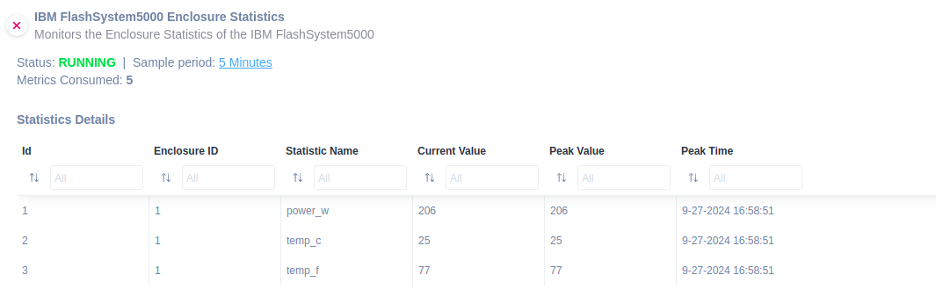
Monitoring IBM FlashSystem 5000 Enclosure Statistics provides valuable insights into hardware performance, helping detect potential issues early.
Easily apply our integration script to be able to monitor the following:
- ID
- Enclosure ID
- Statistic Name
- Current Value
- Peak Value
- Peak Time
Ensure optimal system health, improve efficiency, and reduce the risk of unexpected failures.
