Network visibility and control across every office, every campus, every location

Discover, monitor, and manage your entire IT infrastructure at $1.50 per managed device per month — agent-native, designed for internal IT teams operating across multiple offices, campuses, and remote sites.

Discover every device for free. Pay $1.50 per month only for the devices you actively choose to manage.

G2 4.8 3,600+ customers 40K+ networks SOC 2 + ISO 27001

14-day free trial. No credit card required. Under 15 minutes to deploy. 4M+ devices monitored across 190 countries.

Live demo

See Domotz in action

Click through an interactive product tour — no signup required.

Domotz MCP Server

Empower your junior IT to operate the network in plain English

The Domotz MCP Server lets every IT staff member — junior to senior — operate the network in plain English through ChatGPT, Claude, Perplexity, Gemini, or any AI client. Twenty clicks become one prompt. $1.50 per managed device per month covers both the web app your team uses and the MCP server your AI agents use, with no separate AI tier.

Read More
New chat
Connected to Middle Earth

Internal IT teams spend less and see more with Domotz

Reduce escalations, do more with the budget you already have, and give every IT team member the tools to discover, monitor, and resolve issues.

IT team outcomes

Informatik Group saved over $250,000 in travel and resources by deploying Domotz across 30 sites on 6 continents. Source: Informatik Group case study

Remote setup and continuous visibility across 2,600+ devices and 30 international locations let Informatik avoid sending network engineers to every site.

Read the case study

TKAT scaled from 11 to 45 schools with one centralized IT operations view.

Domotz gave Richard Connor’s team proactive visibility across 45 schools — affordable enough for an education IT budget, simple enough for non-specialists.

Read the case study

Cape Fear Community College keeps remote students connected to campus resources across multiple campuses.

Real-time monitoring, automated alerts, and remote troubleshooting let CFCC’s IT team support remote and distance learners without rolling a truck between campuses.

Read the case study

Feature deep-dives for internal IT teams

Domotz device discovery interface showing layer-2 inventory across an internal IT team's multi-site network
Discover

See every device across every office, campus, and remote location

Layer-2 device identification by MAC address gives internal IT teams accurate inventory across every site — no more finding out a device exists the day it fails.

“Before Domotz, we had no idea what was plugged into our networks. Each school was different, visibility was extremely limited, and we were always reacting after issues had already disrupted teaching.”

Richard Connor, IT Operations Lead, TKAT
Explore Discovery
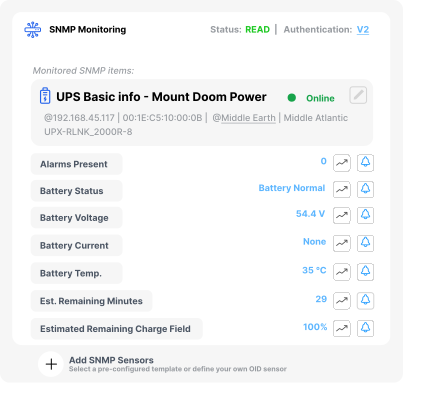
Domotz monitoring dashboard showing real-time device health and alerts for an internal IT team's multi-site network
Monitor

Spot issues before employees notice

Real-time health monitoring across every office, campus, and remote site means your IT team gets to a problem before it lands in a help-desk ticket.

“Informatik Group estimated that, by implementing Domotz, they saved their client well over $250,000 in travel and resources… having 30 remote sites scattered throughout the world would have required a network engineer deployed at each site.”

Informatik Group case study
Explore Monitoring
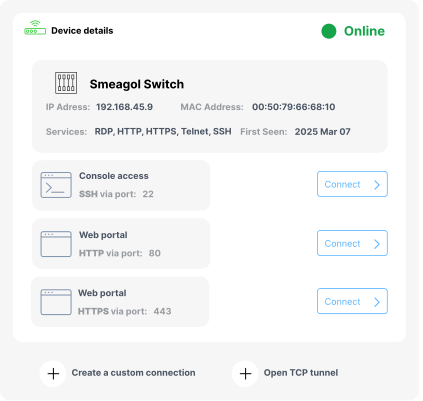
Domotz remote management interface showing actions every internal IT technician can run without an on-site visit
Manage

Resolve issues without rolling a truck or boarding a plane

Reboot, power-cycle, push config, and run remote actions from one console. The same actions are available to your AI agents through the Domotz MCP Server, under the same role-based access control.

“Informatik Group… enabled remote setup and monitoring of 30 sites within 48 hours, a feat that would have been impractical with traditional methods.”

Informatik Group case study
Explore Management
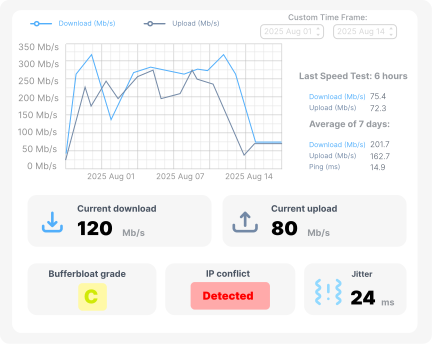
Domotz network diagnostics interface showing performance and connectivity tests for triage by an internal IT team
Network Diagnostics

Diagnose root cause from one console

Performance tests, connectivity probes, and SNMP-derived metrics let your front line identify root cause and skip escalation queues — without specialist network training.

“With Domotz, we can identify failing hardware before it causes downtime. If a hard drive or power supply is showing signs of failure, we get alerted — and fix it before users even notice. That proactive insight is game-changing.”

Richard Connor, IT Operations Lead, TKAT
Explore Network Diagnostics
How Domotz fits internal IT

Pay only for what you actively manage. Discover everything else for free.

Domotz discovery is unlimited and free across every office, campus, and remote site. The $1.50 per month per device only applies to the devices you actively choose to manage — the ones your team or your AI agents push config to, alert on, and report against. Tools priced per discovered device or per node inflate the bill faster than your environment grows.

See how Domotz compares to PRTG

Plug into the ITSM, collaboration, and ticketing stack your team already uses.

  • ServiceNow
  • Microsoft Teams
  • Slack
  • Hudu
View all Integrations

Why internal IT teams choose Domotz

  • Get started fast

    Stand up your first office or campus in 15 minutes. 16 deployment options — Domotz Box, Windows, macOS, Linux, Raspberry Pi, Synology, QNAP, Docker, and more — match whatever hardware you already have.

    Start for Free
  • Expert help when you need it

    Schedule time with our network experts for setup, multi-site rollout planning, or compliance posture review.

    Schedule Meeting
  • Enterprise-grade security

    SOC 2 Type II and ISO 27001 certified. Your organization’s data and network metadata are encrypted in transit and at rest, and every action — from the web console or an AI agent — runs under role-based access control.

    Visit Trust Center
FAQ

Frequently asked questions for internal IT

Multi-site scope, AI access, compliance, comparison, deployment, and licensing — in one place.

  • How does Domotz fit a multi-site enterprise IT team?
    Domotz gives internal IT teams a single console across every office, campus, and remote site. One agent per site discovers every connected device for free, and $1.50 per managed device per month covers monitoring, remote management, and AI access — so every location gets the same level of visibility regardless of how many IT staff sit there.
  • Can my AI agents use Domotz?
    The Domotz MCP Server is a vendor-built MCP server that lets ChatGPT, Claude, Perplexity, Gemini, or any Model Context Protocol client read and act on your network through the open standard. Access uses OAuth-scoped consent and is RBAC-compliant, included at $1.50 per managed device per month with no separate AI tier. Read more about the Domotz MCP Server.
  • Does Domotz support SOC 2, ISO 27001, HIPAA, and PCI compliance workflows?
    Domotz is SOC 2 Type II and ISO 27001 certified, with encryption in transit and at rest and full RBAC on every action. The platform produces the device inventory, change logs, and access records IT teams need to evidence HIPAA, PCI, and internal security control reviews. See the Domotz Trust Center for current posture documentation.
  • How does Domotz compare to Auvik, SolarWinds, and PRTG for internal IT?
    Domotz separates discovery from billing — unlimited free device discovery, then $1.50 per month only for the devices your team actively manages. Auvik bills per billable device after a free tier, SolarWinds and PRTG bill per node or sensor. For multi-site IT teams that want full visibility without per-node sticker shock, Domotz controls TCO predictably. See Domotz vs. PRTG for a side-by-side.
  • Can junior IT staff use Domotz without specialized network training?
    Domotz is built for IT generalists, not just network specialists. Layer-2 discovery is automatic, common actions (reboot, power-cycle, push config, run a connectivity test) live in one console, and the MCP server lets junior staff query the network in plain English. TKAT reached 100% adoption across non-specialist technicians.
  • How does Domotz integrate with ServiceNow, Jira Service Management, and Microsoft Teams?
    Domotz ships native integrations with ServiceNow, Microsoft Teams, Slack, Hudu, and other ITSM and collaboration tools. Network events automatically open tickets, post alerts in the right channel, and update asset records — so IT operations stays in the systems your team already uses without duplicating data entry.
  • What is Domotz's licensing model? Are there per-seat or per-site charges?
    Domotz pricing is $1.50 per managed device per month. There are no per-seat charges, no per-site charges, no per-tenant charges, and no separate AI tier. Discovery, the web app, the MCP server, role-based access for unlimited internal users, and all integrations are included at that single per-device price.
  • How long does deployment take across multiple sites?
    Domotz deploys at a new site in under 15 minutes. There are 16 deployment options — the Domotz Box appliance, Windows, macOS, Linux, Raspberry Pi, Synology, QNAP, Docker, and more — so each office or campus uses whatever hardware is already on-site. Informatik Group used Domotz to stand up 30 international locations within a 48-hour window.
  • Does Domotz monitor cloud workloads and SaaS, or just on-premise hardware?
    Domotz monitors any IP-reachable asset: switches, routers, access points, servers, virtual machines (including Proxmox and Hyper-V), printers, IoT, and the public endpoints that matter to a site (SaaS health probes, ISP uplinks, internet quality). Cape Fear Community College uses Domotz across physical campuses and virtual machine sandboxes simultaneously.
  • Can I keep using Domotz as our organization grows from one site to many?
    Domotz scales linearly with managed-device count, not with site count, user count, or tenant count. Adding a new office or campus takes minutes to scope and minutes to deploy. TKAT used Domotz through a 4× expansion (11 to 45 schools) without re-platforming or renegotiating licensing tiers.

Glossary: network monitoring terms explained.